A folder of product photos is easier to search when each image has a short description and a few consistent fields. Qwen3-VL accepts one image and your prompt, then returns JSON or plain text. The useful workflow is to ask narrowly, keep uncertainty visible, and validate before importing the answer into a catalog.
Ask for visible facts, not missing product data.
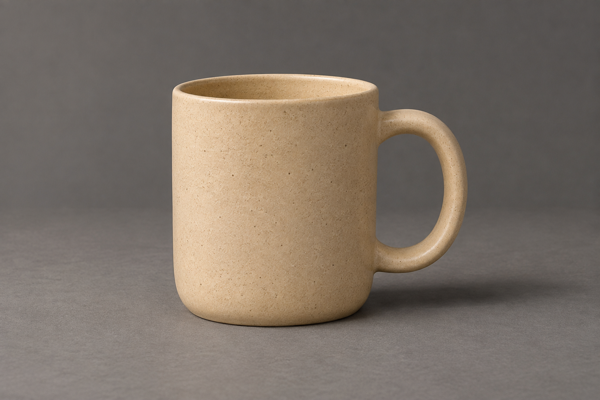
Object type, visible color, and a concise description are sensible fields to request from this image. A brand, exact material composition, capacity, or physical dimensions are not established by the photo. Ask for null when a requested fact is unreadable or uncertain, then fill those fields from your actual product records.
Describe only what this product photo visibly shows. Return one JSON object with object_type, visible_color, brand, material, and alt_text. Use null for unreadable or uncertain fields. Do not infer a brand, material composition, capacity, or dimensions. Keep alt_text to one concise sentence describing the object and its visible setting.This guide shows an input and a request recipe. No Qwen3-VL inference was run for the article. The JSON below is handwritten to explain the response format; it is not a model result or a quality benchmark.
Upload the picture and dry-run the request.
Follow the upload guide: declare the exact content type and byte count, PUT the bytes to the signed upload URL, and keep the returned file ID. The batch takes that ID, rather than an image URL. PNG, JPEG, and WebP inputs may be up to 4 MP and 25 MiB.
The mug input is 600 × 400 pixels, so its 0.24 MP falls within the one-unit floor. The following body declares one unit. For a larger image, calculate its decoded input megapixels and increase max_units within the model limit.
{
  "model": "qwen3-vl-8b",
  "items": [
    {
      "file": "YOUR_UPLOADED_FILE_ID",
      "params": {
        "prompt": "Describe only what this product photo visibly shows. Return one JSON object with object_type, visible_color, brand, material, and alt_text. Use null for unreadable or uncertain fields. Do not infer a brand, material composition, capacity, or dimensions. Keep alt_text to one concise sentence describing the object and its visible setting.",
        "output": "json"
      },
      "max_units": 1
    }
  ],
  "dry_run": true
}curl --fail-with-body "https://www.y-pad.com/v1/batches" \
-H "Authorization: Bearer $YPAD_KEY" \
-H "Content-Type: application/json" \
--data @batch.jsonThe prompt is required and may contain up to 800 characters. Choose output: "json" for the envelope described below, or output: "text" for a plain-text answer. Use one item per uploaded photo, with up to 2,000 items in a batch.
Review held_micros and missing-file results before paying for processing. When ready, remove dry_run and submit with an Idempotency-Key. Reuse the exact key and body when retrying that submission. The submission guide shows the complete request.
Check the envelope before using the fields.
JSON mode returns a JSON envelope, rather than putting your requested fields at the file’s top level. A parsed object appears under data, with parsed: true. The truncated flag says whether generation stopped at the answer limit.
{
  "parsed": true,
  "data": {
    "object_type": "mug",
    "visible_color": "beige",
    "brand": null,
    "material": null,
    "alt_text": "A beige mug with a rounded handle sits on a gray surface."
  },
  "truncated": false
}
If the answer is not a JSON object, the worker keeps it as {"parsed": false, "text": "…", "truncated": false}. It can remove an outer code fence or surrounding sentence once, but does not invent missing fields or repair the meaning. Answers stop at 2,048 tokens; a cutoff can leave truncated: true.
A stored fallback or truncated answer remains billable. A successful item therefore means an answer file was delivered, not that every field is ready for your database. Check both flags, validate your own field types, and review the content.
import json

with open("answer.json", encoding="utf-8") as file:
    answer = json.load(file)

if answer.get("parsed") is not True or answer.get("truncated") is not False:
    raise ValueError("Review this answer before importing it")

fields = answer.get("data")
required = {"object_type", "visible_color", "brand", "material", "alt_text"}
if not isinstance(fields, dict) or not required.issubset(fields):
    raise ValueError("The requested fields are missing")
if any(value is not None and not isinstance(value, str)
       for value in fields.values()):
    raise ValueError("Expected strings or null values")

print(fields["object_type"], fields["alt_text"])
Budget the images, not the answer tokens.
Provisional fares. These are the current limited beta catalog fares. Check the fare table and the dry-run hold before submitting a collection.
The list fare is $0.0020 per image at 1 MP or under, with a $0.0075 minimum per submission. Larger images bill pro rata by decoded input megapixels, up to the 4 MP limit. The fare is not calculated from prompt or answer token counts.
The launch fare is $0.0010 per image unit, with a $0.0075 minimum per submission. It requires an eligible launch seat and at least 20 successful billed units in the submission. Declaring a larger limit does not qualify a smaller or unsuccessful batch.
| Successful photos, each at 1 MP or under | One batch, list fare | Eligible launch fare |
|---|---|---|
| 1 photo | $0.0075$0.0075 minimum per submission. | Below the launch threshold |
| 20 photos | $0.04$0.0075 minimum per submission. | $0.02$0.0075 minimum per submission. |
| 1,000 photos | $2.00$0.0075 minimum per submission. | $1.00$0.0075 minimum per submission. |
The table assumes every item succeeds and the entire collection is one submission. Failed and cancelled items cost nothing. An image that produces a stored answer with parsed: false is a delivered answer and still contributes billed units.
Review the answer alongside its source.
Poll until settled_at is set, then read succeeded items one page at a time. Download each signed output_url without adding your API key to the storage request. Keep the original image and a source identifier alongside every answer.
The model sees a resized version of large images. That does not reduce their billed input megapixels, and tiny writing can become harder to read. Crop a relevant detail before uploading when the task needs small text, then check quotations and labels against the original.
Treat descriptions and tags as drafts. An answer can be valid JSON while misreading a label, overlooking an object, or describing a material the image cannot prove. Review alt text in the context where it will appear, and combine visual fields with authoritative product data.
This is a queued workflow, with a cold start possible before a model runs. No Qwen3-VL latency was measured for this guide. Check model availability and queue information through GET /v1/models and GET /v1/status, and keep your own downloads: Deletion starts at 7 days and normally finishes within a further day.
Have a batch in mind?
Estimate its cost ↗